G-Code Command Reference Table
- By: HDCMFG
G-code (Geometric Code) is the universal programming language used to control CNC (Computer Numerical Control) machines. Developed in the 1950s at MIT, G-code remains the backbone of modern CNC machining, enabling precise control over machining processes like milling, turning, and laser cutting.
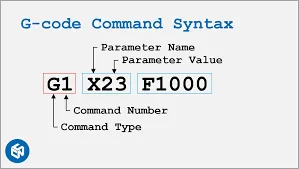
Each G-code command starts with a letter (e.g., G, M, or F) followed by numerical values, directing the machine to:
- Control movement (G-commands): Determine the tool’s path and speed (e.g., moving to coordinates, linear/arc motion).
- Manage functions (M-commands): Handle start/stop actions (e.g., spindle rotation, tool changes, coolant on/off).
While standardized under ISO 6983, variations exist across machine manufacturers (e.g., Fanuc, Haas, Siemens). This table covers 90% of general-purpose G-codes. For advanced functions (5-axis, macros), always consult your machine’s manual for compatibility.
Key Concepts:
- Modal Commands: Remain active until replaced (e.g.,
G01stays in linear motion mode). - Non-Modal Commands: Execute once (e.g.,
G28returns to home position). - Units:
G20(inches) /G21(millimeters). - Coordinate Systems:
G54–G59(work offsets),G90(absolute positioning),G91(incremental positioning). - Sequential Execution: The machine reads code line by line, from top to bottom, No skipping or looping unless using advanced features
G-Code Categories
| Category | Example Commands | Primary Function |
|---|---|---|
| Motion Control | G00, G01, G02, G03 | Tool movement (rapid/linear/arc) |
| Plane Selection | G17, G18, G19 | Select working plane (XY/XZ/YZ) |
| Units & Measurement | G20 (inches), G21 (mm) | Set measurement system |
| Coordinate Systems | G54-G59, G92 | Define work offsets or temporary coordinates |
| Tool Compensation | G40, G41, G42, G43 | Adjust for tool size/length |
| Canned Cycles | G81-G89 | Automated drilling/tapping routines |
| Spindle Control | M03, M04, M05 | Start/stop spindle rotation |
| Coolant Control | M08, M09 | Turn coolant on/off |
| Program Control | M30, M02 | End program/reset machine |
| Special Functions | G28, G53 | Return to home/machine coordinates |
Note: 80% of basic programs use just: G00/G01, G17/G20/G21, M03/M05, and M30.
Common G-Code Command Reference Table
| Command | Function | Parameters | Example | Notes |
|---|---|---|---|---|
| G00 | Rapid Positioning (Non-cutting move) | X, Y, Z (target coordinates) | G00 X10 Y5 Z2 | Avoid collisions; no cutting occurs. |
| G01 | Linear Interpolation (Cutting move) | X, Y, Z, F (feed rate) | G01 X20 Y15 Z0 F150 | Maintain consistent feed rate for surface finish. |
| G02 | Clockwise Circular Interpolation | X, Y, I, J, K (arc center offsets) | G02 X30 Y30 I5 J0 | I/J/K define arc center relative to start point. |
| G03 | Counter-Clockwise Circular Interpolation | Same as G02 | G03 X40 Y20 I0 J-5 | Used for arcs and circles. |
| G17 | XY Plane Selection | None | G17 | Default plane for most milling operations. |
| G18 | XZ Plane Selection | None | G18 | Used for lathe operations. |
| G19 | YZ Plane Selection | None | G19 | Rarely used in standard milling. |
| G20 | Inch Units | None | G20 | Sets all values to inches. |
| G21 | Metric Units | None | G21 | Sets all values to millimeters. |
| G28 | Return to Home Position | X, Y, Z (optional via intermediate) | G28 X0 Y0 Z0 | Machine moves to reference point. |
| G40 | Cancel Cutter Compensation | None | G40 | Disables tool radius offset. |
| G41 | Left Cutter Compensation | D (tool radius offset number) | G41 D1 | Compensates for tool radius to the left of the path. |
| G42 | Right Cutter Compensation | D (tool radius offset number) | G42 D2 | Compensates for tool radius to the right of the path. |
| G43 | Tool Length Compensation | H (tool height offset number) | G43 H3 | Adjusts for tool length; critical for multi-tool setups. |
| G54 | Work Coordinate System 1 | None | G54 | Selects pre-defined work offset (G54–G59). |
| G80 | Cancel Motion Modes | None | G80 | Cancels cycles (e.g., drilling, tapping). |
| G90 | Absolute Positioning | None | G90 | All coordinates are relative to origin. |
| G91 | Incremental Positioning | None | G91 | Coordinates are relative to current position. |
| M03 | Spindle Start (Clockwise) | S (spindle speed) | M03 S2000 | Spindle rotates clockwise at 2000 RPM. |
| M04 | Spindle Start (Counter-Clockwise) | S (spindle speed) | M04 S1500 | Used for reverse cutting operations. |
| M05 | Spindle Stop | None | M05 | Stops spindle after operation. |
| M06 | Tool Change | T (tool number) | M06 T5 | Automatic tool change (requires ATC). |
| M08 | Coolant On | None | M08 | Activates flood coolant. |
| M09 | Coolant Off | None | M09 | Turns off coolant. |
| M30 | Program End & Reset | None | M30 | Ends program and resets machine. |
| F | Feed Rate | Feed value (units/min or units/rev) | F200 | Set in G94 (units/min) or G95 (units/rev). |
| S | Spindle Speed | RPM value | S3000 | Speed depends on material and tool type. |
| T | Tool Selection | Tool number | T4 | Prepares tool for M06 command. |
FAQ
Do I need to memorize all G-codes?
No. Modern CAM software generates most code automatically. Focus on understanding common commands like G00, G01, M03, and M30.
Are G-codes the same for all machines?
Basics are universal, but advanced features vary by brand. For example:
- Haas: G187 (high-speed mode)
- Fanuc: G05.1 (smoothing)
Always check your machine’s manual for specifics.
Can a wrong G-code damage the machine?
Yes. For examples:
Using G00 (rapid move) instead of G01 (slow cut) → Tool crashes into the workpiece.
Forgetting M05 (spindle stop) → Spinner keeps rotating after the program ends.
How do I use G-code safely?
- Test first: Run programs in “dry run” mode (no cutting).
- Single-block mode: Execute one line at a time to catch errors.
- Backup settings: Note down machine offsets before editing.
- Clean workspace: Remove debris that could interfere with motion.
Can I edit G-code manually?
Yes, but only tweak values you fully understand and never modify tool paths without CAM software – small errors can cause crashes.
What software creates G-code?
CAM programs: Fusion 360, Mastercam, SolidWorks CAM (paid), FreeCAD, Easel (web-based).
Note: Avoid writing code from scratch unless you’re experienced.
Resources
- LinuxCNC G-Code Documentation
- Fanuc 30i/31i/32i Series Programming Manual
- Siemens 840D SL Advanced Programming Guide
- ISO 6983-1 Standard
- Haas Mill Programming Workbook
- Mazak SmoothX CNC Programming Manual
- G-Code Basics (NRAO)
- CNC Cookbook Blog
- NC Viewer (Web, Free)
- CAMotics (Open-source)
- Vericut
- Practical Machinist
- LinuxCNC Forum
- Stack Exchange – Manufacturing
- Reddit r/CNC